How to use Stratos
Everything you need to know about building strategies, running backtests, and leveraging Orbit AI to find your edge.
What is Stratos?
Stratos is an AI-powered financial market intelligence platform. Research live markets, design systematic trading strategies, and rigorously backtest them — all without writing a single line of code. Describe what you want to Orbit, tweak it in the visual builder, and run it against years of institutional-grade market data in seconds.
Research
Ask Orbit about any market, sector, or asset. Get real-time analysis with cited sources — like having a quant analyst on demand.
Build & Test
Describe a strategy in plain English or configure it visually. ATLAS runs it against historical data with Monte Carlo analysis.
Iterate
Use the results dashboard and Orbit's analysis to understand what worked, what didn't, and how to sharpen your edge.
Research only — for now. Stratos is currently a backtesting and research platform. It does not connect to brokerages or execute live trades. Live Alerts, Live Deployment, and Broker Integration are coming soon.
The Strategy Builder
The Strategy Builder at /strategies is where you configure every aspect of your strategy. It has six main areas.
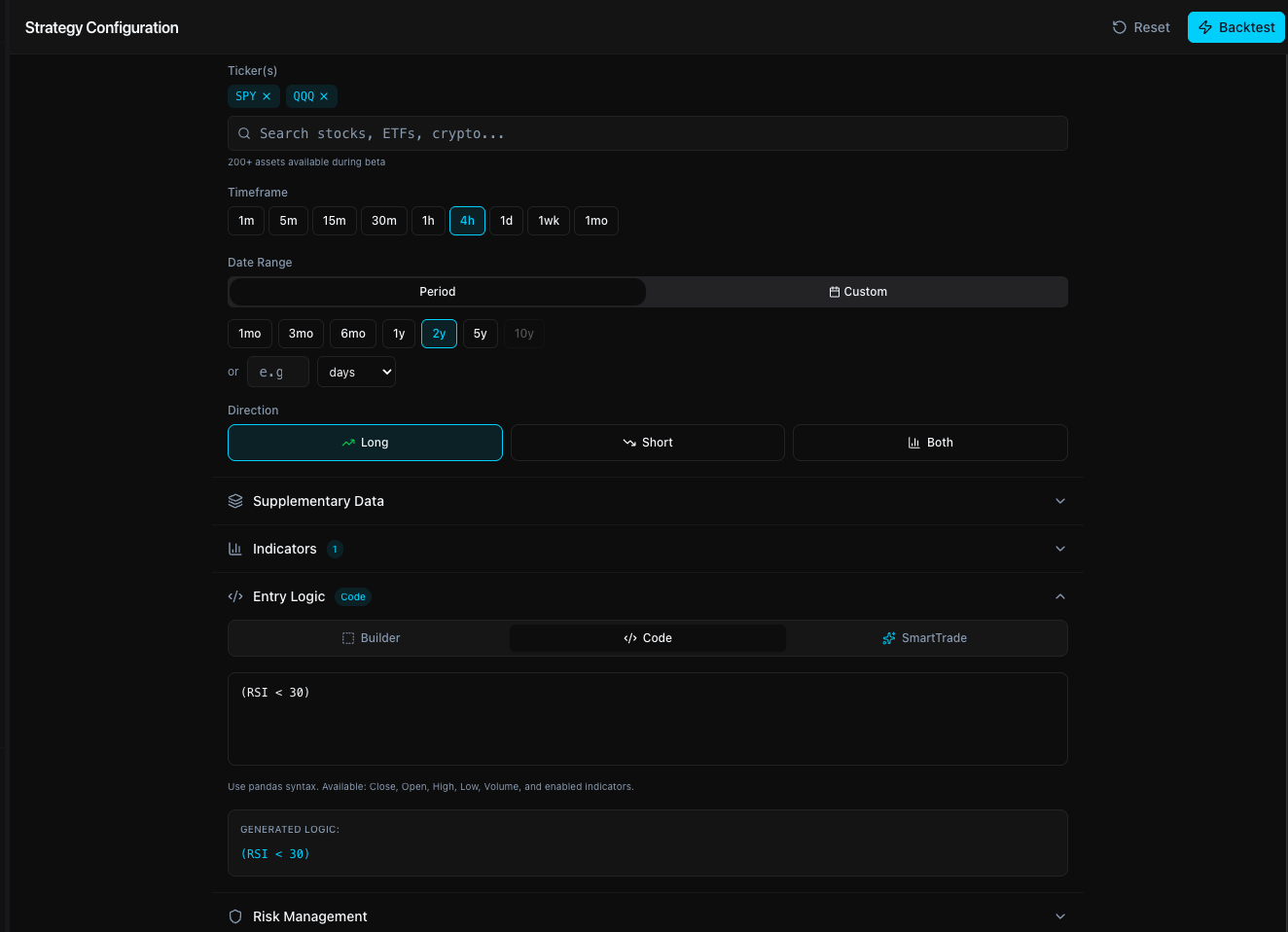
1. Asset Universe
Select one or more tickers to trade. You can also add supplementary tickers (e.g., SPY, QQQ, VXX, TLT) whose data feeds into your entry logic — useful for macro-conditional strategies without trading those assets directly.
Stratos supports a curated universe of US equities, sector ETFs, commodity ETFs, bond ETFs, and leveraged instruments during beta. The asset universe expands post-beta.
2. Timeframe & Period
Choose the bar resolution and the historical window to test over.
Intraday bars use Alpaca minute data. Daily and above use adjusted OHLCV.
Or pick exact start/end dates for a custom date range.
3. Indicators
Enable the technical indicators you want available in your entry and exit logic. Each has configurable parameters — once enabled, their computed values can be referenced directly in conditions.
Relative Strength Index
Exponential Moving Average
Simple Moving Average
MACD + Signal Line
Upper, Middle, Lower Bands
Average True Range
Average Directional Index
%K and %D oscillator
Volume-Weighted Avg Price
Price momentum
Commodity Channel Index
Williams Percent Range
Automatic warmup period
ATLAS automatically determines the longest indicator period you have configured and removes that many bars from the start of the backtest. For example, if you enable SMA(200), the first 200 bars are excluded from signal generation — preventing false signals from incomplete indicator values. Your effective backtest window is slightly shorter than configured when using long-period indicators.
4. Strategy Mode
Choose whether your strategy trades Long, Short, or both directions. This determines how many sides you need to configure — Long and Short have completely independent entry logic and risk management.
Long Only
Only takes buy positions. Standard for equity strategies.
Short Only
Only takes short positions. For bearish or hedging strategies.
Long + Short
Takes both directions. Configure entry logic and risk for each side independently.
5. Entry Logic — Three Modes
Stratos supports three distinct ways to define when to enter a trade. In Long + Short mode, each side gets its own independent entry logic.
Visual condition builder. Add rows of conditions joined by AND / OR logic. Each condition has a left operand, an operator, and a right operand. Supports modifiers like previous bar, rolling average, and percent change.
Quick presets: Momentum Breakout, RSI Oversold, 3% Gap Up, Trend Following.
Write entry logic as a Python-style boolean expression. Reference any enabled indicator by name. Supports all standard operators and parenthetical grouping.
(RSI < 30) & (Close > EMA_50) & (MACD > MACD_signal)Use a trained SmartLab model as your entry signal. Select a model you've trained in SmartLab — it outputs a BUY signal when its prediction meets your threshold. Requires a trained model in your account.
6. Risk Management
Risk rules are enforced at the per-trade level by the ATLAS engine, applied independently per side (Long / Short).
- Percentage — Fixed % below entry price (e.g., 2%)
- ATR-based — Multiple of Average True Range (e.g., 2x ATR)
- Indicator — Exit when price crosses a level (e.g., below EMA_50)
- Trailing Stop — Activates after a gain threshold, then trails by a set %
- Single — Exit 100% of position at a target % gain
- Scaled / Partial — Exit in tranches (e.g., 50% at 5%, rest at 10%)
- Indicator — Exit when price crosses a technical level
Running a Backtest
Once your strategy is configured, click Run Backtest. The ATLAS engine processes your strategy as a background job — you'll see a live status overlay while it runs.
Data Fetch
ATLAS pulls historical OHLCV bars from Alpaca for all selected tickers across your chosen period and timeframe.
Indicator Calculation
All enabled indicators are computed on the full dataset. The warmup period (longest indicator period) is automatically removed from the signal window.
Signal Generation
Your entry logic is evaluated bar-by-bar. Executions fill at the open of the next bar to eliminate look-ahead bias.
Risk Management
Take-profit and stop-loss levels are checked on every subsequent bar. Slippage and commission are modeled in.
Monte Carlo Analysis
The engine runs 1,000+ simulations by resampling trade outcomes to statistically validate your edge.
Results
You're redirected to the results dashboard with full metrics, equity curve, trade log, and Monte Carlo distribution.
No look-ahead bias. All trades fill at Open[T+1] — the opening price of the bar after the signal. Your strategy never uses data it couldn't have known at signal time.
Understanding Your Results
The results page shows a professional-grade quantitative breakdown. The equity curve leads the page — giving you an immediate visual read on how your strategy performed — followed by color-coded metrics grouped from primary to secondary. Every threshold follows standard quantitative finance conventions: green is good, amber is acceptable, red needs attention.
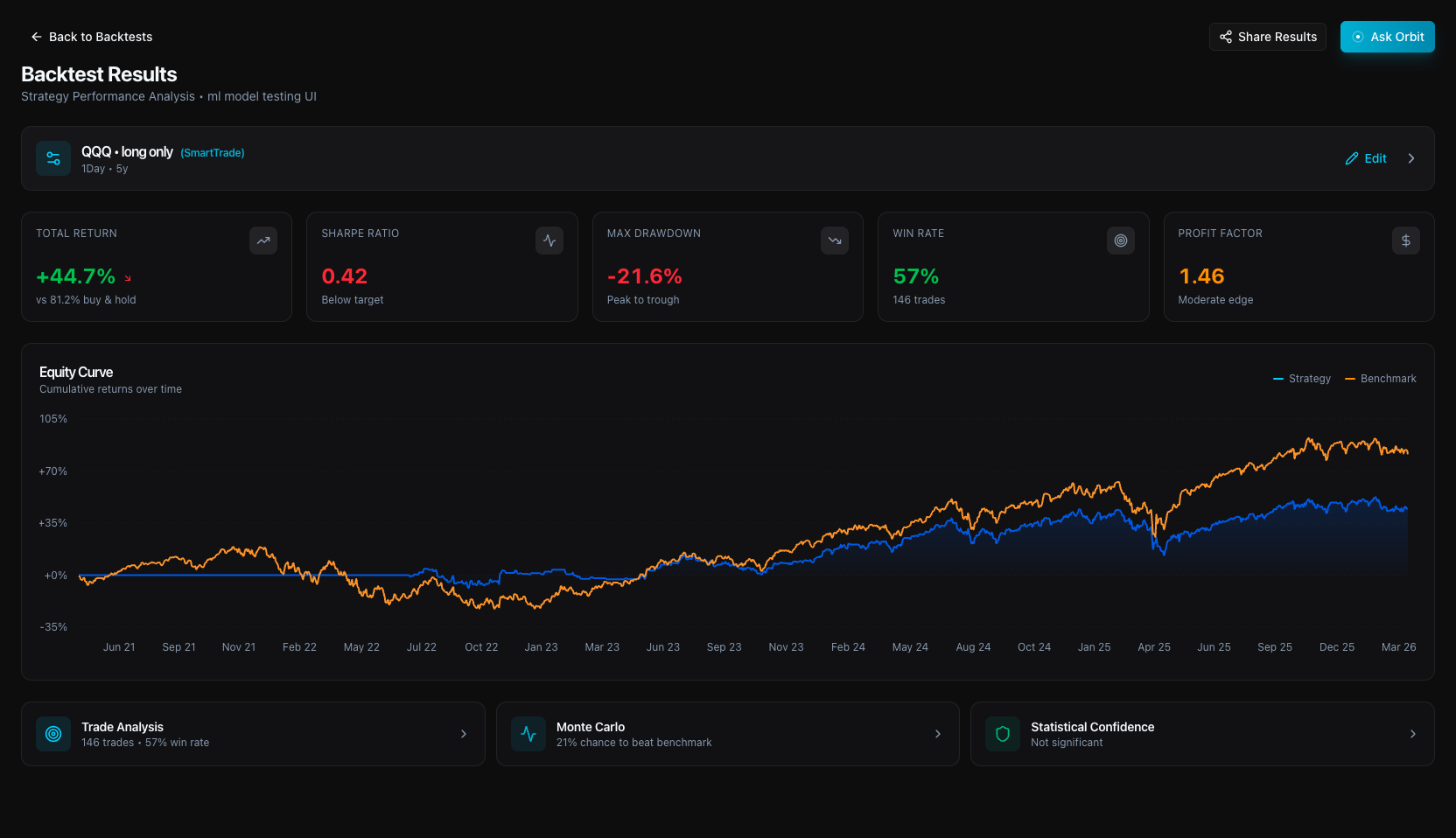
Equity Curve
The first thing you see — your portfolio value over time plotted against the benchmark (buy-and-hold). The gap between the two lines is your alpha. A strategy that trails buy-and-hold over a full market cycle has no edge worth the added complexity.
Primary Metrics
Total Return
Cumulative percentage gain or loss over the entire backtest period, after slippage and commissions. Shown alongside the benchmark return so you can see whether the strategy beats passive buy-and-hold.
Sharpe Ratio
Annualized excess return divided by total return volatility. Tells you how much reward you get per unit of risk. A Sharpe below 0.5 means the strategy doesn't compensate for the volatility it introduces.
Max Drawdown
The largest peak-to-trough decline in portfolio value across the entire backtest. This is the worst-case capital loss you would have experienced — a critical input for position sizing and risk tolerance.
Win Rate
Percentage of trades that closed at a profit. Importantly, a high win rate alone does not indicate a good strategy — a 40% win rate can be highly profitable if winners are significantly larger than losers. Pair with Profit Factor.
Profit Factor
Gross profit from all winning trades divided by gross loss from all losing trades. A factor of 2.0 means you earned $2 for every $1 lost. Values below 1.0 indicate a net-losing strategy regardless of win rate.
Secondary Metrics
These metrics provide deeper insight into how the strategy manages downside risk and how efficiently it converts drawdown into return. They appear in a compact strip below the primary metrics.
Sortino Ratio
Like Sharpe, but only penalizes downside volatility — upward swings are not counted against the strategy. Better for strategies with asymmetric return profiles where large wins are common. Uses a 4.28% annualized risk-free rate.
Calmar Ratio
Annualized return divided by maximum drawdown. Unlike Recovery Factor, this uses the annualized return — so a 5-year strategy is compared on the same footing as a 1-year strategy. Higher means more return per unit of worst-case pain.
Recovery Factor
Total return divided by maximum drawdown — a simpler cousin of the Calmar ratio that uses raw total return instead of annualizing. A factor of 3.0 means the strategy gained 3x what it lost at its worst point. Best read alongside Calmar when comparing strategies of different lengths.
Expectancy
The average return per trade, weighted by win rate and loss rate. Formula: (win rate × avg win) + (loss rate × avg loss). A positive expectancy confirms the strategy has mathematical edge — each trade is worth taking on average, even if individual outcomes vary.
Monte Carlo Analysis
ATLAS runs 1,000+ simulations by randomly resampling your trade outcomes. This answers the critical question: is this edge real, or am I just seeing a lucky sequence?
Median Return
The 50th-percentile return across all simulations. Your most realistic expected outcome.
5th Percentile
The worst-case return in 95% of simulations. A conservative lower bound on your downside.
95th Percentile
Best-case return in 95% of simulations. Shows upside potential under favorable trade sequencing.
Risk of Loss
Fraction of simulations that ended with a net loss. Lower is better.
Prob. Beat Benchmark
Percentage of simulations that outperformed buy-and-hold SPY. Above 70% indicates a robust edge.
Return Std Dev
Volatility of simulated returns. Lower means results are more consistent across different trade sequences.
Trade Log
Every individual trade is listed — entry date, exit date, entry price, exit price, return, and exit reason (take-profit hit, stop-loss triggered, or signal exit). Use this to audit the strategy's behavior trade-by-trade.
Tip: Click Edit Strategy on any results page to reload that exact configuration into the Strategy Builder — tweak and re-run instantly.
Orbit AI
Orbit 2.0 is your AI-powered research terminal. It searches the web in real time, analyzes live market conditions, builds strategies from plain English, and explains backtest results with data-backed reasoning — like having a senior quant analyst available 24/7.
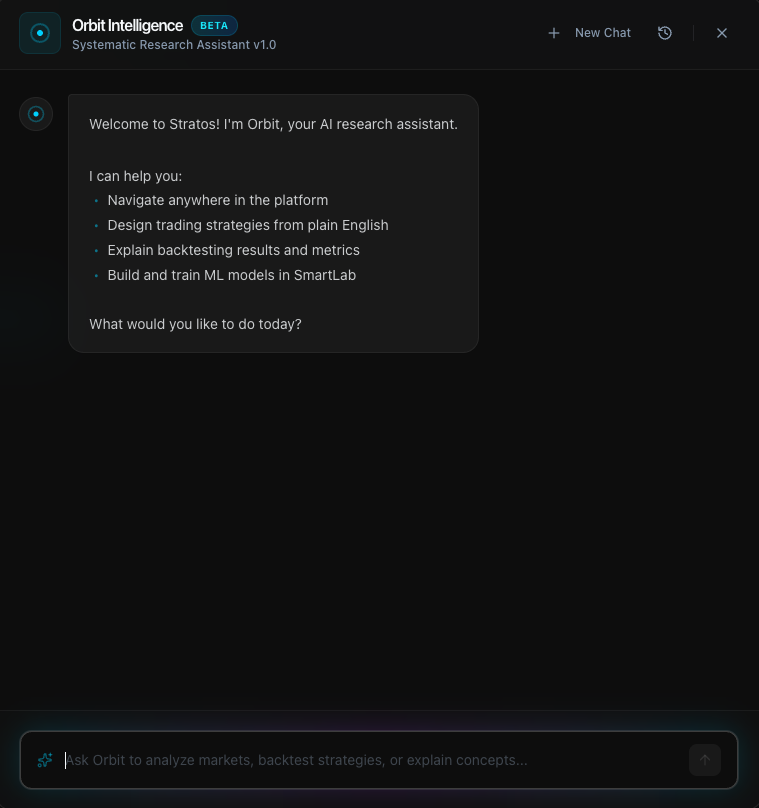
Core Capabilities
Real-Time Market Research
Ask about any ticker, sector, or macro trend. Orbit searches the web live, synthesizes multiple sources, and cites everything — so you can verify.
Strategy Generation
Describe a strategy in plain English. Orbit configures tickers, indicators, entry logic, and risk parameters, then populates the Strategy Builder automatically.
Backtest Analysis
After a backtest completes, ask Orbit to explain the results. It reads the actual metrics and gives specific, data-backed explanations — not generic advice.
Strategy Refinement
Tell Orbit what you want to change. It modifies only the relevant fields, explains its reasoning, and lets you iterate without starting over.
Quant Education
Ask anything about indicators, risk metrics, portfolio theory, or market mechanics. Orbit explains concepts clearly, with examples relevant to your strategy.
Transparent Reasoning
Orbit shows its thinking process in real time — which tools it's using, what it's searching for, and how it arrives at its answer. No black boxes.
How It Works
Thinking
When you ask a question, Orbit shows a live thinking indicator with the tools it's invoking (web search, backtest lookup, strategy analysis). You can see exactly what it's doing.
Sources
For research queries, Orbit cites its sources at the bottom of each response. Click any source to verify the information directly.
Actions
When Orbit builds or modifies a strategy, it generates action buttons (Backtest, View Results, Save) that let you act on its suggestions with a single click.
Memory
Orbit remembers context within a conversation session. You can iterate naturally — "now add a trailing stop" — without restating the full strategy each time.
Example Prompts
“What's happening with NVDA today? Any catalysts?”“What's the market sentiment on semiconductors right now?”“Build me a mean reversion strategy on QQQ that buys when RSI drops below 30 and sells when MACD crosses above the signal line.”“Create a trend-following strategy on NVDA using EMA crossover — go long when the 20 EMA crosses above the 50 EMA, with a 3% stop loss.”“Analyze my latest backtest — why was the Sharpe ratio low?”“Adjust the take profit to 8% and add a trailing stop that activates after a 5% gain.”“Build a momentum strategy that only enters if SPY is above its 200-day moving average — use SPY as a macro filter.”SmartLab — ML Models
SmartLab is Stratos' machine learning studio. Instead of rules like “buy when RSI < 30”, you train a model to learn entry patterns directly from price data — then use it as the signal source in the Strategy Builder.
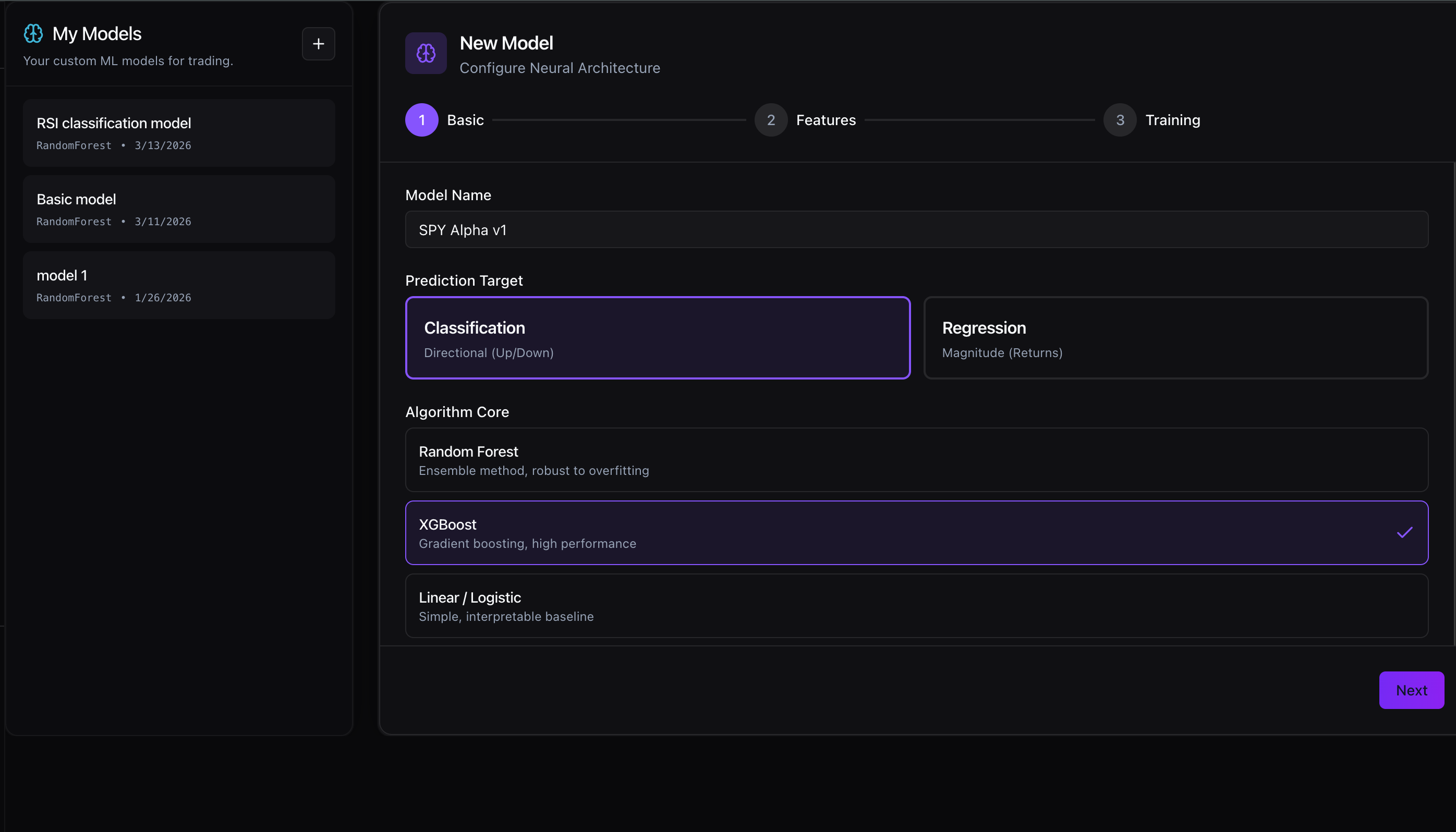
Create a Model
Go to SmartLab and click New Model. Give it a name, choose a prediction target (Classification for Up/Down direction, Regression for return magnitude), and select an algorithm core.
Configure & Train
Select the ticker, timeframe, and training window. Choose walk-forward validation (recommended — trains on rolling windows to prevent overfitting) or a fixed train/test split.
Use in a Strategy
In the Strategy Builder, set Entry Mode to ML and select your trained model. ATLAS uses its predictions as the entry signal during backtesting.
Random Forest
Ensemble method, robust to overfitting. Good default choice.
XGBoost
Gradient boosting, high performance on structured data.
Linear / Logistic
Simple, interpretable baseline for directional prediction.
Tips & Best Practices
Start with Orbit, refine in the Builder
Let Orbit generate the initial strategy from a description, then open the Builder to manually fine-tune indicators, periods, and risk levels. This is the fastest iteration loop.
Test longer periods first
A 5–10 year backtest includes multiple market regimes (bull, bear, choppy). Strategies that only work in one regime aren't robust. Good edge survives 2020, 2022, and 2024.
Trust Monte Carlo over point-in-time returns
A 50% return on a single run could be a lucky sequence. If the Risk of Loss is above 25% or the 5th percentile is deeply negative, the edge is fragile regardless of the headline return.
Use supplementary tickers as macro filters
Add SPY or TLT as a supplementary ticker and reference them in your entry logic (e.g., only go long when Close > SPY_EMA_200). This is a classic regime filter that reduces drawdown in bear markets.
Account for indicator warmup when choosing periods
If you enable SMA(200) and test over 1 year of daily data (~252 bars), ATLAS removes the first 200 bars as warmup — leaving only ~52 bars for signal generation. Use longer test periods when using long-lookback indicators.
Size your stop loss to the timeframe
A 2% stop on a 1-minute chart will get hit by noise. A 1% stop on a daily chart may be too tight. ATR-based stops automatically scale to the asset's current volatility.
Use the Trade Log to audit signal quality
If most losses are stop-loss exits rather than signal exits, your stop is too tight. If you have very few trades over a long period, your entry conditions are too restrictive.
What's Coming Soon
Stratos is actively developed. Here's what's on the near-term roadmap.
Paper Trading Mode
In DevelopmentRun strategies in real-time against live market data without risking capital. Validate that your backtest results hold up in live conditions before committing.
Live Deployment & Broker Integration
In DevelopmentConnect Stratos directly to your brokerage. Execute strategies live with the same logic you validated in backtesting — closing the loop from research to real money.
Expanded Asset Universe
PlannedBroader coverage of US equities, options data, and crypto pairs. The beta uses a curated list — post-beta opens the full market.
Advanced SmartLab Models
PlannedAdditional ML architectures and signal-filtering layers that stack on top of your existing indicator logic for ensemble-style strategies.
Frequently Asked Questions
Where does your market data come from?
We source institutional-grade historical OHLCV data from Alpaca Markets. Minute and intraday data comes from their market data API; daily and weekly bars use adjusted prices to account for splits and dividends.
Does Stratos execute real trades or connect to my brokerage?
Not yet. Stratos is currently a research and backtesting platform. Live Deployment and Broker Integration are in development and coming soon.
How accurate are the backtests?
ATLAS is validated against QuantConnect across multiple strategy types and timeframes — results match within acceptable variance (differences are attributable to intraday bar data provider differences, not engine errors). All fills use Open[T+1] pricing to eliminate look-ahead bias. Slippage and commissions are modeled.
What can Orbit do? Can it see my data?
Orbit 2.0 can search the web for live market data, analyze your backtest results, build and modify strategies, and explain financial concepts. It can only read your strategies or backtests when you explicitly ask it to. We do not use your data to train shared models or share it with other users. Your alpha is yours.
What assets can I backtest?
During beta, Stratos supports a curated universe of US-listed stocks (S&P 500 constituents and popular growth stocks), index ETFs (SPY, QQQ, IWM, DIA), sector ETFs, commodity ETFs, bond ETFs, and leveraged ETFs. The full asset universe expands post-beta.
How far back does historical data go?
Daily data is available from approximately 2015 onward for most assets. Intraday minute data availability varies by ticker — most liquid names have 5+ years of intraday history.
Can I backtest multiple tickers at once?
Yes. Add multiple tickers to your asset universe and the ATLAS engine tests each one independently, then aggregates results. You can also add supplementary tickers (like SPY or VXX) as macro data inputs without trading them directly.
What programming knowledge do I need?
None required for the Builder or ML modes. Code mode uses a simple Python-style boolean expression syntax — no functions, imports, or classes. If you can write a spreadsheet formula, you can write entry logic in Code mode.
What is a Founding Member?
Founding Members are early users who locked in a discounted lifetime rate during the beta launch period. They receive the same full platform access as paid subscribers, at a permanently reduced price.
Still need help?
Our Discord community is the fastest way to get answers, discuss strategies, and report issues directly to the team.
Join our Discord